goodcryptoX alternative: where Good Crypto users can go now it has closed
goodcryptoX, the trading app many people still call Good Crypto, stopped working on 9 October 2026. The app, its bots, its exchange trading and its built-in wallets all closed that day. If you used it to watch and trade across several exchanges from your phone, TabMira does much of that job for free. If you used it for bots, it does not.
What happened to goodcryptoX
goodcryptoX was a multi-exchange trading app for iOS and Android: one place to trade on centralized exchanges through API keys, run DCA, grid and signal bots, place trailing stops and multiple take profits, trade on DEXes from a built-in wallet, and track a portfolio across all of it.
On 17 September 2026 it announced that it was winding down because revenue no longer covered its costs. Users were told to move everything out of the built-in wallets and to stop their bots and check their orders at each exchange. The app shut on 9 October 2026. There were no cash refunds; instead, paid subscription time carried over to WunderTrading, an independent company, with bonus days on top.
Moving over from goodcryptoX
- Revoke the API keys you gave goodcryptoX. Sign in to each exchange, open its API management page and delete any key you made for goodcryptoX. The app is gone, but a key stays valid until you remove it.
- Check your open orders and positions at each exchange. Orders that were placed on the exchange are still there and can still fill. Anything goodcryptoX ran on its own side, such as its bots, stopped with it, so a position a bot was managing is no longer being managed.
- Check the built-in wallets. They closed with the app. goodcryptoX told users to withdraw before 9 October 2026, and said Solana wallets could export their private key instead; if you saved that key, any Solana wallet can import it.
- Open tabmira.com or install the Android app. On iPhone, open the site in Safari and choose Add to Home Screen.
- Build a watchlist: search a symbol once and TabMira lists it on every exchange that trades it. Set alerts by holding a finger on the chart at a price, or from the Alerts tab.
- To trade or see balances, make a new API key on each exchange without withdrawal rights and add it in the Portfolio tab.
If you used bots: WunderTrading
goodcryptoX picked WunderTrading as the place for its users, and if your setup was DCA, grid or signal bots, that is where to look first. It runs bots on most of the centralized exchanges goodcryptoX supported and on Hyperliquid, and your unused subscription time went there. By goodcryptoX's own account it has no iOS app (iPhone users use its web app), no AMM DEX trading, and its interface, portfolio tracking and bot charts are not one-to-one with what you had. TabMira has no bots at all, so for that part of goodcryptoX it is not a replacement.
What TabMira covers
Watchlists and charts across 93 exchanges
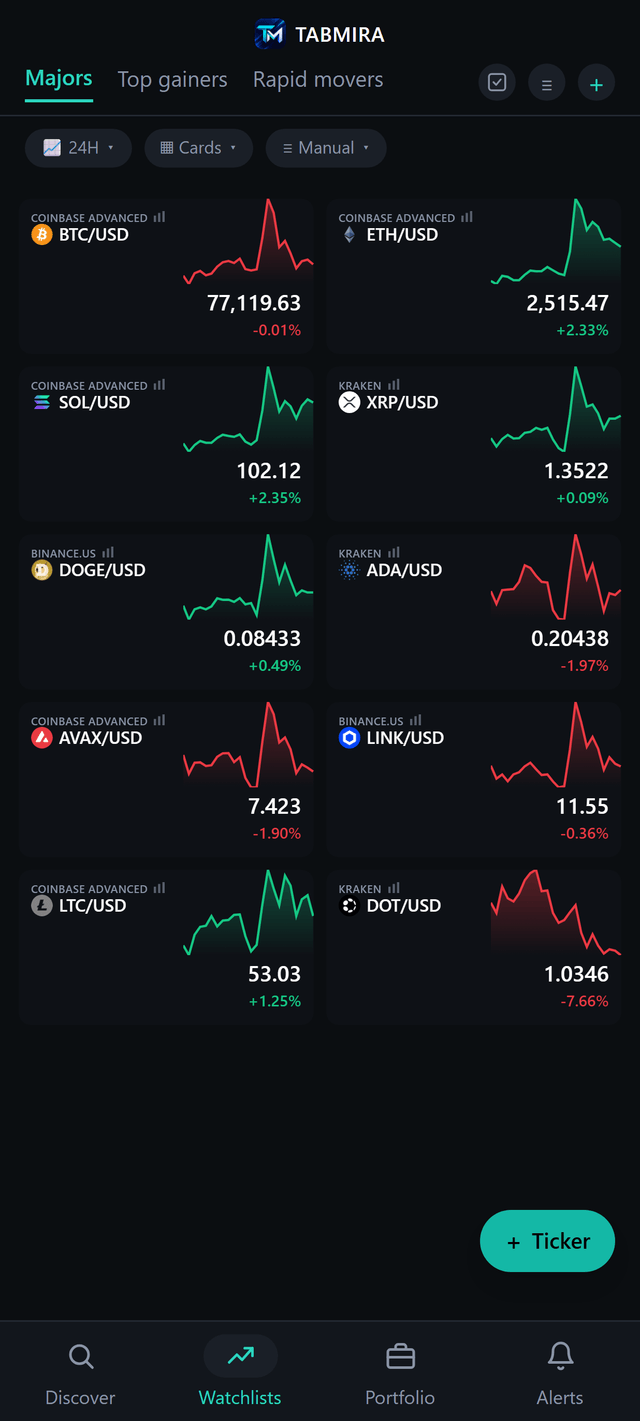
A watchlist mixes pairs from any of 93 exchanges, spot and futures side by side, each with a live price, 24h change and a sparkline. Tap a pair for a full chart with the exchange's order book and live trades beside it: EMA, SMA, Bollinger Bands, RSI, MACD, volume profile and more with no cap per chart, TradingView community scripts from the indicator shelf, and trendlines, levels and Fibonacci saved on the pair. Every exchange, with what works on each.
Alerts
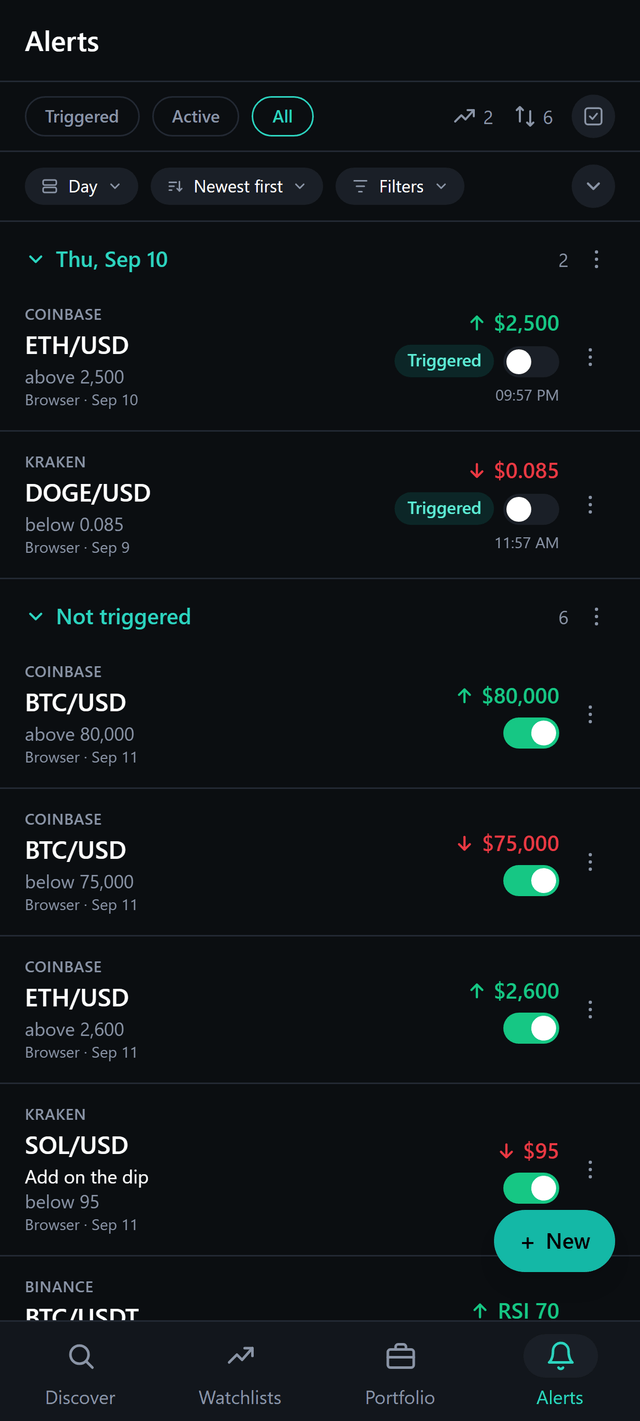
Price, percent move, RSI and time alerts on any pair on any exchange, up to 1,000 at once, sent as push notifications on Android, iPhone and the web. They are checked on the server, so they fire with the app closed.
Portfolio
Connected exchange accounts on one ring showing how your money is split across coins, with the total, today's move and each account's balances. The tab locks behind a passcode, fingerprint or Face ID.
Trading from your own keys
Limit and market orders on Coinbase Advanced and Binance, and on 22 more exchanges in beta, among them Kraken, Bybit, OKX, Binance.US, Bitget, KuCoin, Gate.io, MEXC, HTX and Bitfinex. Beta means the order code is tested but no real order had gone through it when it shipped, and the app labels it so. Open orders and fills show next to the chart, and each order is a line on it you can drag. Keys are encrypted on your device and never sent to TabMira servers. Which exchanges trade, and how. Where your keys go.
What TabMira does not do
- No trading bots: no DCA, grid or signal bots.
- No trailing stops, no multiple take profits, and no take profit or stop loss on an order.
- No AMM DEX trading and no built-in wallet. Hyperliquid spot is the one on-chain venue it trades.
- No native iPhone app yet: on iPhone it installs from Safari with Add to Home Screen.
If those were what you used goodcryptoX for, TabMira will feel like a step back. If you used it to watch a lot of pairs, get alerts and place the odd order on a few exchanges, it does that for free.
goodcryptoX vs TabMira side by side
| Feature | goodcryptoX | TabMira |
|---|---|---|
| Status | Closed 9 October 2026 | Live, in active development |
| Price | Plus, Pro and Max subscriptions, or Lifetime | Free, no ads, no tiers |
| Trading bots | DCA, grid and signal bots | None |
| Order types | Limit, market, trailing stop, multiple take profits | Limit and market |
| Exchange trading | Many exchanges via API key | Coinbase Advanced and Binance, plus 22 more in beta |
| DEX trading | AMM DEXes from a built-in wallet | None; Hyperliquid spot in beta |
| Built-in wallet | Yes | No |
| Portfolio | Exchanges and wallets | Connected exchange accounts |
| Platforms | iOS and Android apps | Web, Android, iPhone (Add to Home Screen) |
goodcryptoX's column describes the app as it stood when it closed, from its own notice.
Questions
What happened to goodcryptoX?
It wound down because revenue no longer covered its costs. The announcement came on 17 September 2026, and the app, trading, bots and the built-in wallets stopped on 9 October 2026. Its website now says it has closed.
Where did goodcryptoX send its users?
To WunderTrading, an independent company. Paid goodcryptoX subscribers had their remaining time carried over to a WunderTrading plan with bonus days, and Lifetime subscribers and Ultimate NFT holders were offered two years of WunderTrading Premium. There were no cash refunds.
Are my exchange orders and positions still open?
Orders that were placed on an exchange stay there until they fill or you cancel them, and positions stay open. goodcryptoX told users to stop their bots and check every order and position at the exchange before it closed. If you did not, sign in to each exchange and look now.
Does TabMira have trading bots?
No. There are no DCA, grid or signal bots, and no trailing stops or multiple take profits. If bots were the main reason you used goodcryptoX, WunderTrading is the closer fit.
Can TabMira trade on DEXes?
Not on AMM DEXes, and it has no wallet of its own. The one on-chain venue it trades is Hyperliquid spot, in beta, through an API wallet that cannot withdraw. Perpetuals on Hyperliquid are charted, not traded.
Is TabMira free?
Yes. Charts, watchlists, alerts, portfolio and trading are free. There is no subscription, no ads and no account to create.
Where do my API keys go in TabMira?
A key you add is encrypted on your device and used from there to talk to the exchange. It is never sent to TabMira servers. Some exchanges refuse requests from a web page, and in a browser those go through a relay you deploy in your own Cloudflare account. Make keys without withdrawal rights.