TradingView alternative for crypto: a free terminal for people who watch more than one exchange
TradingView is the best charting tool there is, and this page is not going to tell you otherwise. What it is going to say is who it is wrong for. If you use it for crypto, keep an eye on pairs across several exchanges, and are paying for a plan or living with the free caps mostly to get more alerts and more indicators on a chart, then TabMira was built for you. It charts every pair on 80 exchanges with the exchange's own order book beside the chart, puts no cap on indicators, runs up to 1,000 alerts, and is free with no plan behind it.
What TradingView does better
Start here, because it decides whether to read on. TradingView charts every market: stocks, forex, indices, commodities, bonds and crypto, on one screen. It has Pine Script and a library of community indicators and strategies that nothing else matches, a bar replay, a deeper drawing toolbox, published ideas to read and argue with, and order routing through connected brokers. If any of those is the reason you open it, stay. TabMira is for crypto, has no script editor or backtester, and runs a Pine script only when it can convert it.
What it does instead is the part of the crypto job that TradingView is not shaped for: watching a lot of pairs on a lot of exchanges at once, with the exchange's live book and tape, on a phone that opens the next chart without a wait.
Every exchange, not one symbol
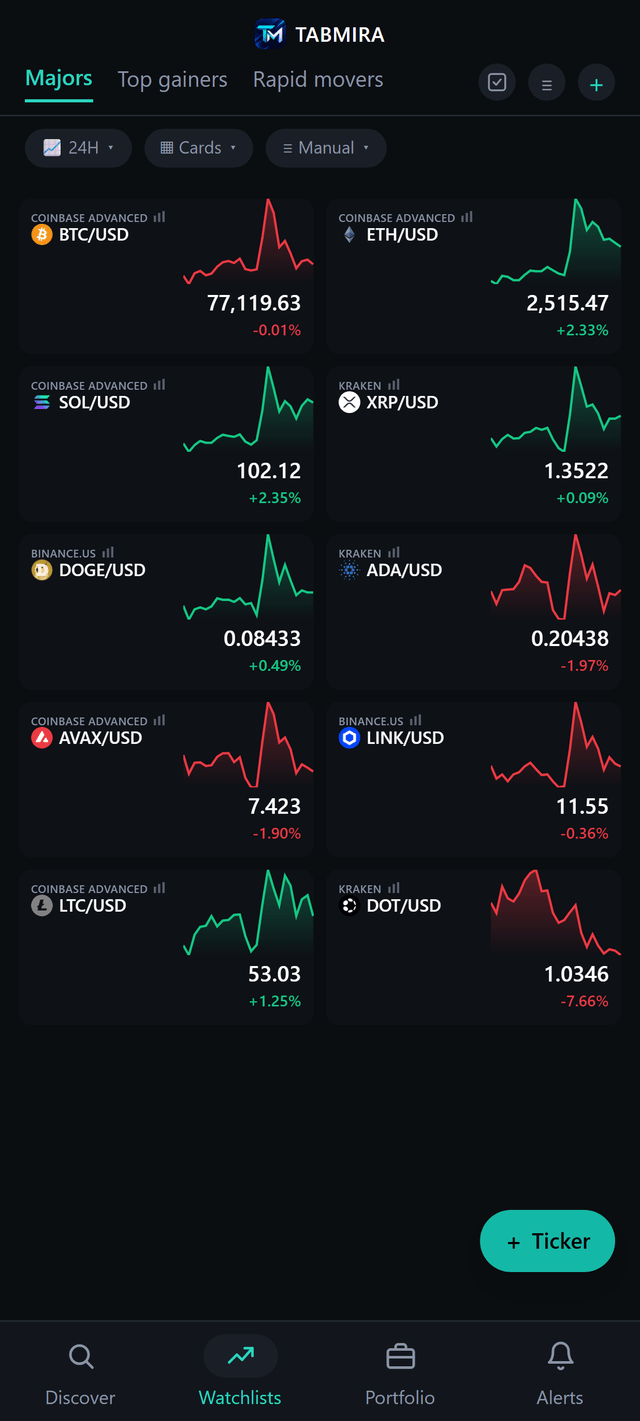
On TradingView a crypto chart is one symbol on one exchange, and comparing the same coin across venues means typing each one in. In TabMira a watchlist mixes pairs from any of 80 exchanges: BTC/USD on Coinbase next to BTC/USDT perps on Bybit next to a KuCoin small cap, spot and futures side by side, each with a live price, 24h change and a sparkline. Search a symbol once and it lists that pair on every exchange that trades it. Prices, candles, order books and trades come straight from each exchange's own feed, not from a data vendor in between.
Tap any pair and the exchange's order book depth and live trade tape sit beside the chart. On TradingView that is a second tab open on the exchange.
Charts
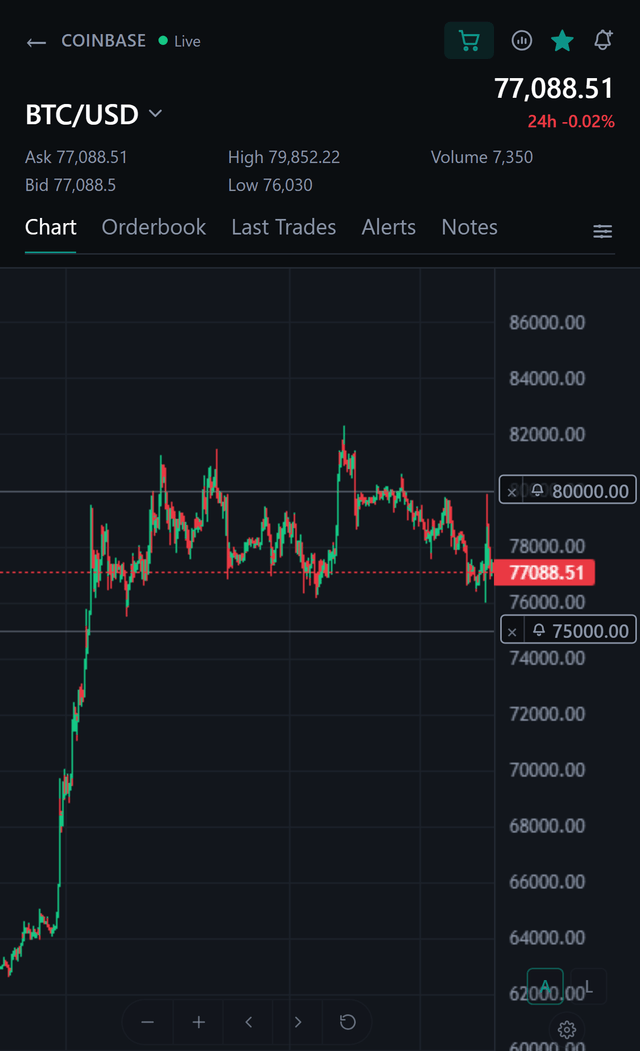
13 chart styles: bars, candles, hollow candles, volume candles, columns, line, line with markers, step line, area, hlc area, baseline, high-low and heikin ashi. Indicators: EMA, SMA, Bollinger Bands, RSI, MACD, Choppiness, volume, volume profile and daily levels, as many as you want on one chart, with your own lengths and colours, shared across every chart or pinned to one, plus TradingView community scripts from the indicator shelf or a pasted link, converted to run here. Drawings: trendlines, rays, channels, horizontal and vertical lines, rectangles, arrows, Fibonacci retracements, arcs and extensions, and text notes, each with its colour, width and line style, saved on the pair you drew them on. Timeframes run from one minute to one month plus custom intervals, and there is a light theme.
On a desktop the chart page lays out up to nine charts at once, linked or independent, with a watchlist beside them and a button that pages the list through the grid. On a phone the chart engine was written for the phone: it runs at the screen's refresh rate and pans and pinches without stutter, which is the first thing people notice after trying TradingView's web app on a phone.
Alerts
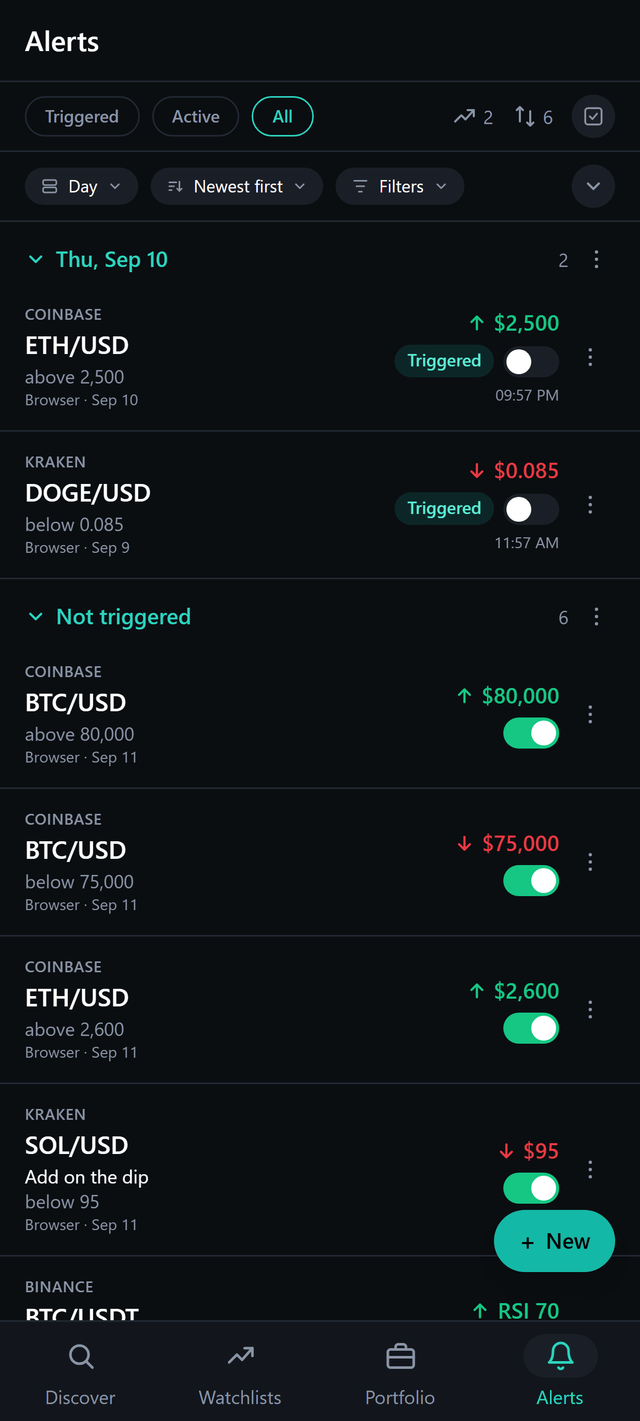
Alerts are the usual reason a TradingView user pays. The free plan allows a handful of active alerts and the paid plans raise the number in steps. TabMira runs up to 1,000 at once, free: price alerts, percent moves over a window, RSI crossing a level and alerts at a set time, on any pair on any exchange. They fire as push notifications on the web, in the Android app and on iPhone. An alert level sits on the chart's price scale, and you can hold it and drag it to a new price. Alerts are the one thing that lives on a server, because a phone in your pocket cannot watch the market; they follow an optional sign-in so a second device gets the same ones.
Screener
The Discover screen scans every market on every one of the 80 exchanges: top gainers and losers, volume leaders and rapid movers, spot and futures, with one search across all of them. Any of those boards can be turned into a watchlist that updates itself, so a list of today's top gainers on Binance and Bybit rotates on its own as the market moves.
Trading
Trading works on Coinbase Advanced and Binance, and on 22 more exchanges in beta, from an API key you make yourself. Open orders and fills show next to the chart, the ticket places limit and market orders, and every order is a line on the chart you can drag. Binance testnet and the OKX and Bybit demo accounts are supported for practice. The key is encrypted on your device, or held in a relay you deploy in your own Cloudflare account, and is never sent to TabMira servers. The security page shows the code that handles keys. Which exchanges trade, and how.
Price
Free. There is no plan ladder: no indicator cap, no alert cap, no watchlist cap, no ads, and nothing a subscription would unlock. You do not need an account. Watchlists, layouts, drawings and settings stay on your device, and signing in with Google or an email link is only there to carry alerts and settings to another device.
TradingView vs TabMira side by side
| Feature | TradingView | TabMira |
|---|---|---|
| Markets | Stocks, forex, crypto, futures, indices | Crypto, plus market-cap indexes and a few macro symbols |
| Price | Free with ads and caps; paid plans lift them | Free, no ads, no tiers |
| Account | Required | None needed; optional sign-in syncs alerts |
| Crypto exchanges | Many, charted one symbol at a time | 80, spot and futures, mixed in one watchlist |
| Order book and trade tape | Not beside the chart | Live, from the exchange, beside the chart |
| Indicators per chart | Capped on the free plan | No cap |
| Custom indicators | Pine Script and a community library | Community scripts converted from Pine; no editor |
| Charts per layout | One on the free plan | Up to nine on desktop |
| Alerts | Capped on the free plan | Up to 1,000 at once |
| Alert types | Price, drawing, indicator | Price, percent move, RSI, time |
| Market screener | Yes, per asset class | Discover: gainers, losers, volume, rapid movers across every exchange |
| Trading | Through connected brokers | Coinbase Advanced and Binance, plus 22 more in beta, via your own API key |
| Where your keys live | Broker connection held by TradingView | Encrypted on your device, or your own Cloudflare relay |
| Platforms | Web, desktop app, iOS, Android | Web, Android, iPhone (Add to Home Screen) |
TradingView's plan limits change with each pricing revision, so they are described rather than quoted. The current numbers are on tradingview.com.
Switching from TradingView, or using both
Nothing has to be cancelled. Plenty of people keep TradingView for the one chart they are studying and use TabMira for the forty pairs they are watching and the alerts on them.
- Open tabmira.com or install the Android app. On iPhone, open the site in Safari and choose Add to Home Screen.
- Export your TradingView watchlist as text, then search each symbol in Discover and tap the exchanges you want it from. A mixed list of thirty pairs takes a few minutes.
- Set your alerts again. Hold a finger on any chart to drop an alert line at that price and drag it where you want it, or use the Alerts tab. Sign in with Google or an email link if you want them on a second device.
- If you trade on one of the exchanges that trade here, make a new API key without withdrawal rights and add it in the Portfolio tab.
Other TradingView alternatives for crypto
TabMira is not the only option, and it is not the best one for everybody. Coinigy is a web-first terminal for desktop traders with order placement on many exchanges, on a paid plan. GoCharting is a charting site in TradingView's mould with a free tier and its own scripting. Good Crypto (goodcryptoX), a mobile terminal with bots, closed in October 2026. Each exchange's own app is the fastest way to trade that one exchange, and most of them embed TradingView's charting library, so the chart you know is often already there. TabTrader, which many crypto users ran beside TradingView, shut down in August 2026. TabMira is the pick if what you want is a fast, light terminal across a lot of exchanges, with alerts that fire, no ads and no subscription.
Questions
Is TabMira a full replacement for TradingView?
Only for crypto. TabMira charts crypto exchanges, plus the crypto market-cap indexes and a short list of macro symbols (the S&P 500, gold, Treasury yields, CME futures) to keep beside them. No stocks or forex. If you trade those, keep TradingView. If TradingView is where you watch crypto pairs across several exchanges, TabMira does that job with the exchange order book beside the chart, no caps and no subscription.
Is TabMira free, and what is the catch?
It is free, and there is no paid plan behind it. No indicator cap, no alert cap, no watchlist cap, no ads. You do not even need an account. The gaps: trading is proven on Coinbase Advanced and Binance and still in beta on 22 more exchanges, and Pine scripts run only when they convert, with no editor and no backtests.
Does TabMira have Pine Script or custom indicators?
Partly. Besides the built-in set (EMA, SMA, Bollinger Bands, RSI, MACD, Choppiness, volume, volume profile, daily levels and more), the indicator picker has a shelf of TradingView community scripts, and you can paste a TradingView script link or Pine code. TabMira converts the script and runs it on the chart. Not every script converts, a strategy runs as an indicator with its orders left out, and there is no editor or backtester. If your setup depends on writing Pine or testing strategies, stay on TradingView.
Can I import my TradingView watchlist?
Not as a file. TradingView exports a watchlist as a text list of symbols, which works as a checklist: search each symbol once in Discover and it shows that pair on every exchange that trades it, so a list of thirty pairs is rebuilt in a few minutes. Drawings and alerts have to be set again.
Which exchanges does TabMira chart?
Coinbase, Binance, Kraken, Bybit, KuCoin, OKX, MEXC, Crypto.com, Gate, Bitget, HTX, Hyperliquid and 68 more, 80 in all, spot and futures. Prices, candles and order books come straight from each exchange. The full list is at tabmira.com/exchanges.
Does TabMira work on a desktop?
Yes. tabmira.com runs in any modern browser. On a desktop screen the chart page lays out up to nine charts at once, with a watchlist beside them and a button that pages the list through the grid. There is nothing to download.
Is there a mobile app?
There is an Android app on Google Play. On iPhone, open tabmira.com in Safari and choose Add to Home Screen; alerts and the full chart work from there. The web version on a phone browser is the same app.
Can I trade from TabMira?
On Coinbase Advanced and Binance, and on 22 more exchanges in beta (among them Kraken, Bybit, OKX, Binance.US, Bitget and KuCoin), with an API key you make yourself. Limit and market orders, open orders and fills next to the chart, and every order as a line you can drag. The key is encrypted on your device and never sent to TabMira servers. Make it without withdrawal rights.